Grouping a Collection
Grouping means sorting elements into buckets. You choose a key for every element, and all elements with the same key land in the same bucket.
The key is computed by a small function that takes one element and returns its key. For example, the first letter of a word.
Map.groupBy() does the whole job. Give it an array and a key function and it returns a Map from key to an array of the elements with that key.
A Map keeps its keys in the order they were first added, so the printed output always looks the same. console.log() prints a Map like this: Map(1) { 'a' => [ 1 ] } — the number of keys first, then every key and its value. When one line would get too long, the keys are printed one per line instead.
There is also Object.groupBy(), which returns a plain object instead of a Map. The examples here use Map.groupBy(), because a Map accepts keys of any type and prints how many keys it has.
Group By Key
The simplest grouping keeps the elements as they are and only decides which bucket each one goes to.
Pass the array and a key function to Map.groupBy(). The result is a Map from key to the array of elements with that key. The elements inside a group keep the order they had in the input.
Sometimes you want to change the elements while grouping, for example store them in upper case. Map.groupBy() has no parameter for that. Write the loop yourself: compute the key, compute the new value, and push the new value into the group. groups.get(key) ?? [] gives the group that is already there, or a new empty array for a key you have not seen yet.
Group words by first letter
The key function takes the first letter of the word with w[0] and makes it upper case with toUpperCase(). Words that start with the same letter end up in the same array. The keys print in the order they were first seen: 'O', 'T', 'F'.
Output: TypeScript file and captured output
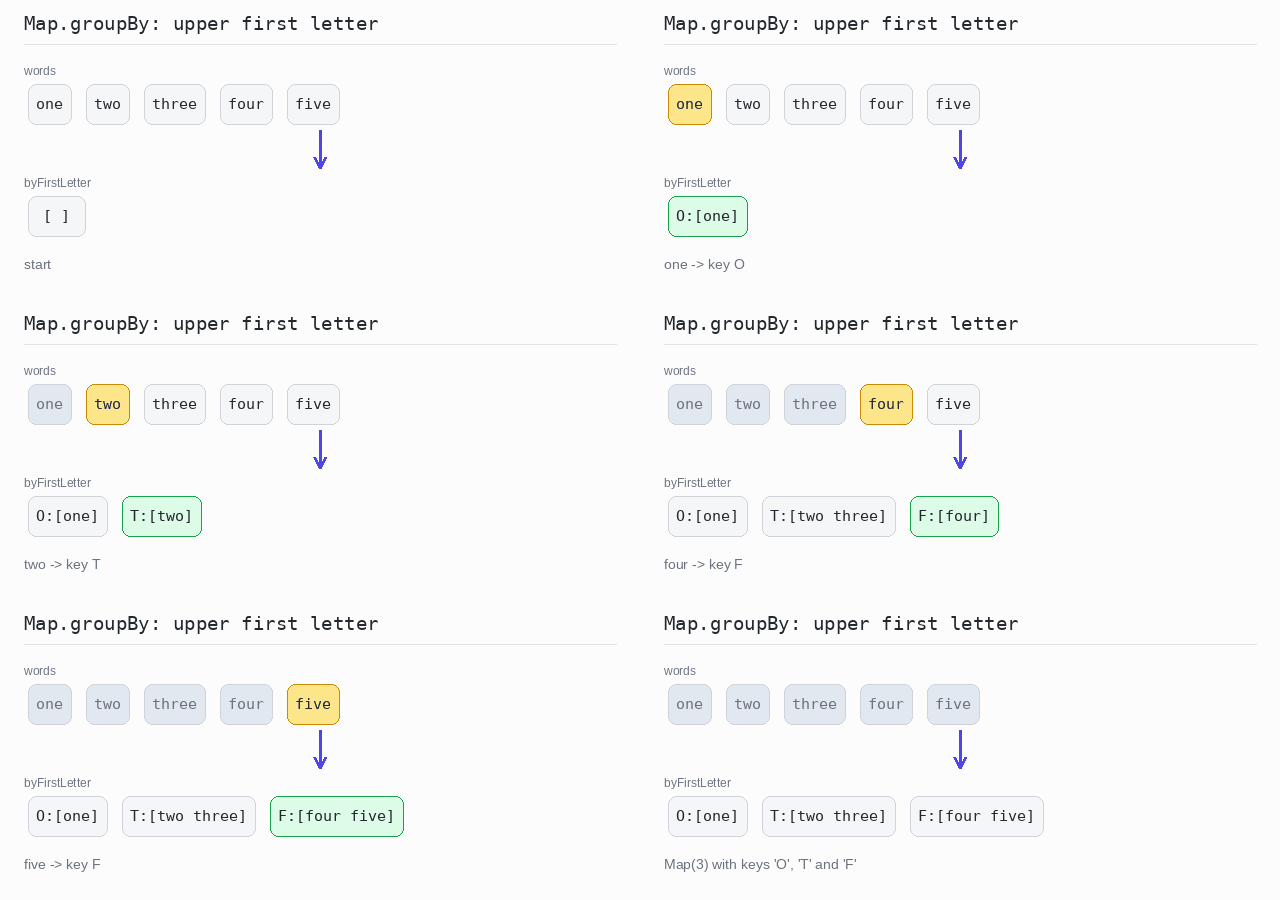
const words: string[] = ["one", "two", "three", "four", "five"]

// Map.groupBy() calls the key function for every word and collects the groups.
const byFirstLetter = Map.groupBy(words, w => w[0].toUpperCase())

console.log(byFirstLetter)
Group and change the values
The key is the lower-case first letter. The stored value is the whole word in upper case. A for...of loop does both steps and pushes the new value into the array from groups.get(key) ?? [].
Output: TypeScript file and captured output
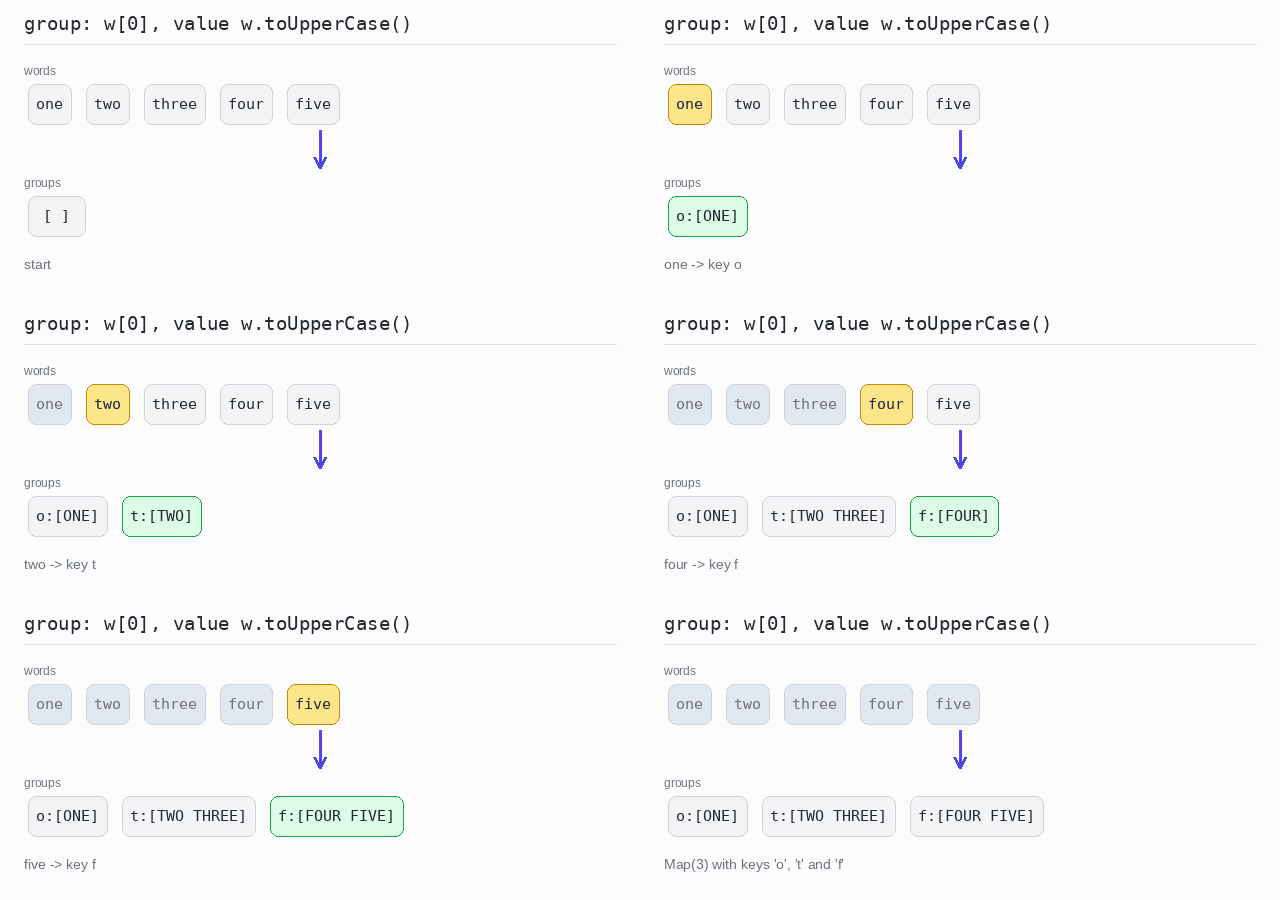
const words: string[] = ["one", "two", "three", "four", "five"]

// Map.groupBy() cannot change the values, so build the Map with a loop.
const groups = new Map<string, string[]>()
for (const w of words) {
  const key = w[0]               // lower-case first letter
  const value = w.toUpperCase()  // the value stored in the group
  const group = groups.get(key) ?? []
  group.push(value)
  groups.set(key, group)
}

console.log(groups)
Count Each Group
Often you do not need the elements of each group, only how many there are.
There is no eachCount(). Use a Map<string, number> instead. Reading a key that is not in the Map gives undefined, not 0, so write (counts.get(key) ?? 0) + 1. The ?? operator supplies the starting value 0 for the first element of a group.
Count words per first letter
Every word adds 1 to the count of its first letter. The Map ends up with one number per letter: 'o' => 1, 't' => 2 and 'f' => 2.
Output: TypeScript file and captured output
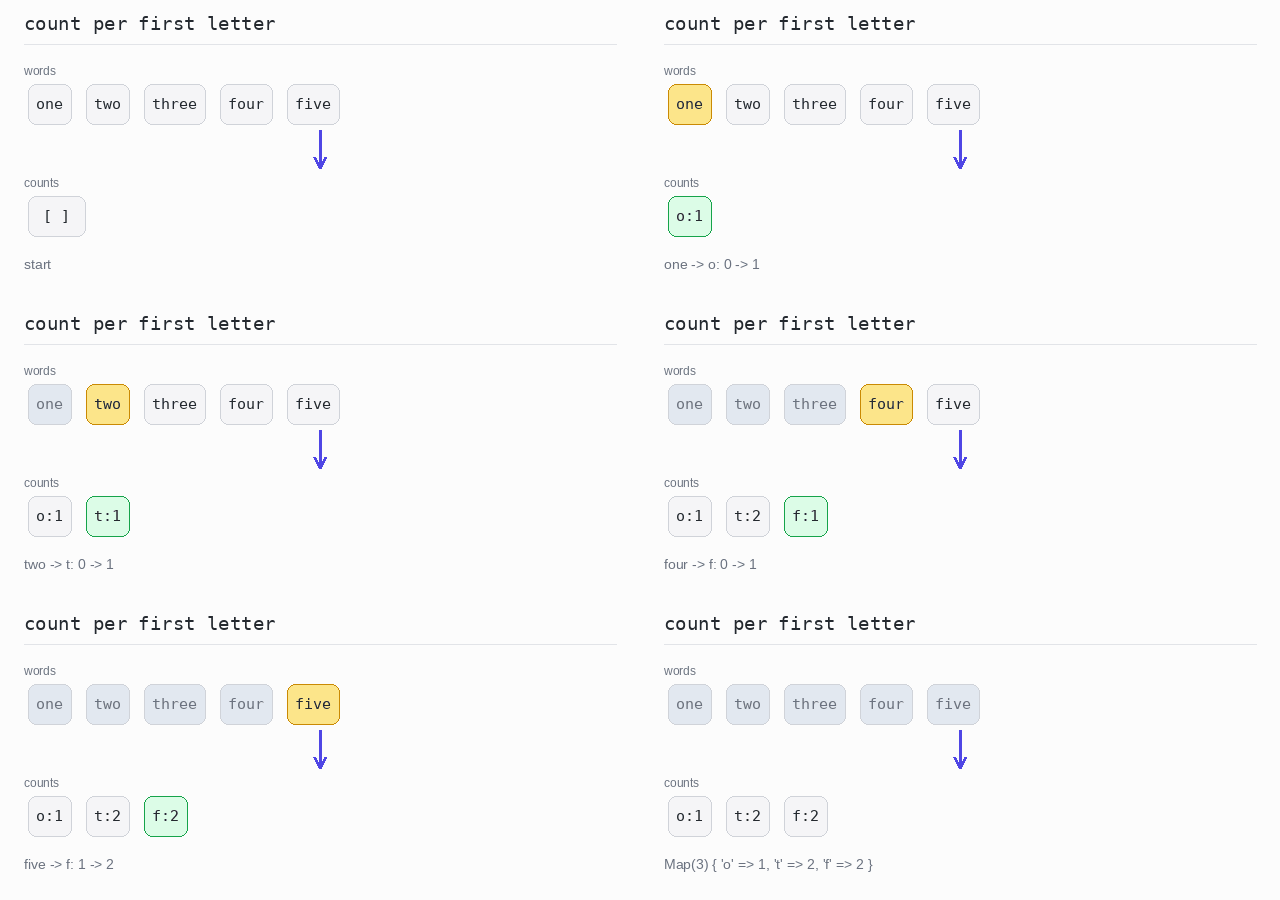
const words: string[] = ["one", "two", "three", "four", "five"]

// get() gives undefined for a new key, so ?? 0 starts the count at 0.
const counts = new Map<string, number>()
for (const w of words) {
  const key = w[0]
  counts.set(key, (counts.get(key) ?? 0) + 1)
}

console.log(counts)
Fold and Reduce per Group
Folding a group means combining its elements into one value, step by step. A running total is the classic example: start at 0 and add each element.
reduce() does exactly this. It carries one value — the accumulator — through the whole array. Here the accumulator is a Map that holds the running value of every group. For each element you compute its key and update the value stored under that key.
When the running value has a starting value, such as 0 for a sum, ?? 0 supplies it for a key that is not there yet. When the first element itself must start the value, compare the result of get() with undefined to tell the two cases apart.
Sum each group
Each number is put in the group "even" or "odd" and added to that group's sum with acc.set(key, (acc.get(key) ?? 0) + n). A new key starts at 0, so no special case is needed. The first number is 3, so 'odd' is the first key of the Map.
Output: TypeScript file and captured output
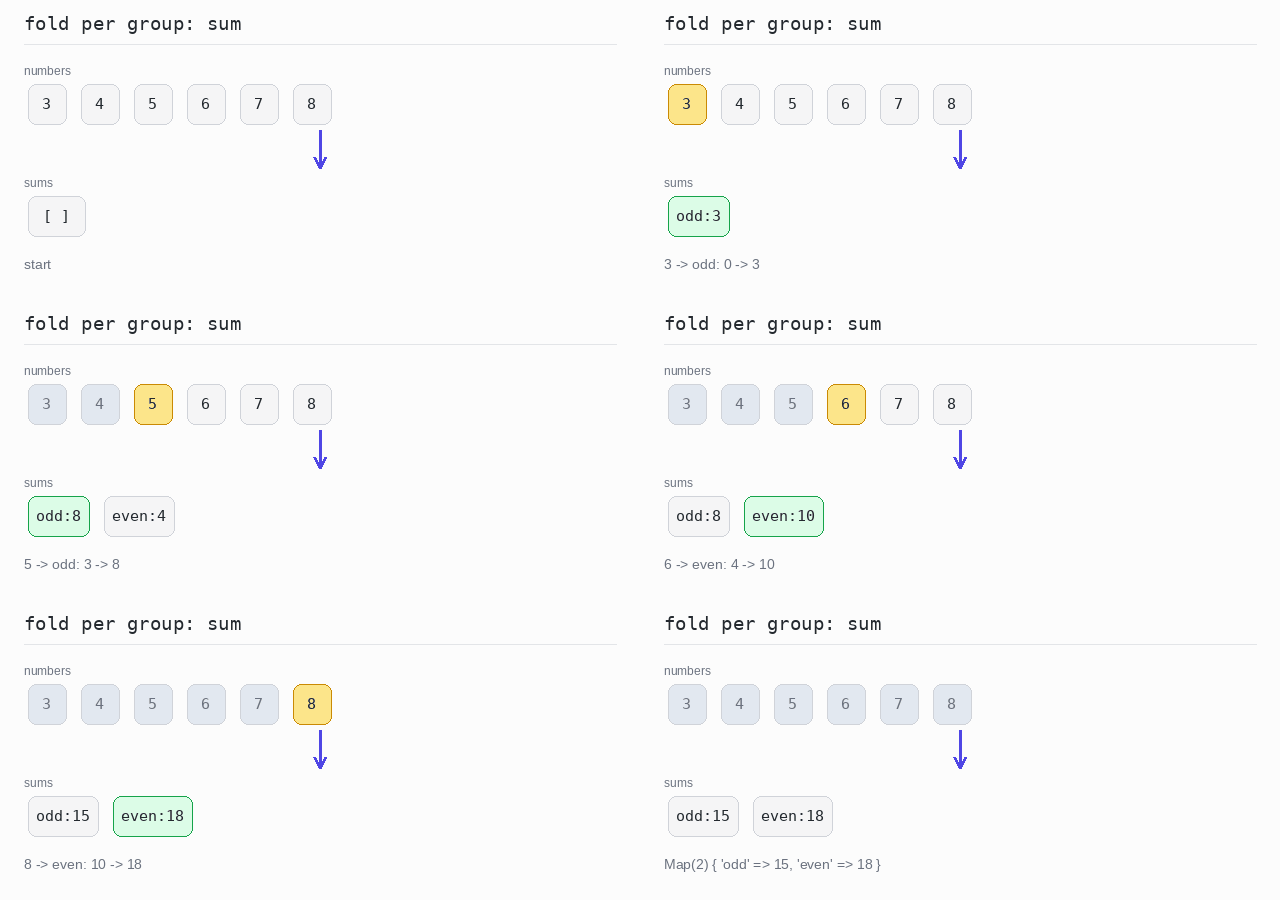
const numbers: number[] = [3, 4, 5, 6, 7, 8]

// reduce() folds the array into one Map of running sums.
const sums = numbers.reduce((acc, n) => {
  const key = n % 2 === 0 ? "even" : "odd"
  return acc.set(key, (acc.get(key) ?? 0) + n)
}, new Map<string, number>())

console.log(sums)
Build a string per group
The first number of a group starts the string. Every later number is joined with "+". acc.get(key) gives undefined for a group that is still empty, and that tells the two cases apart. String(n) turns a number into text.
Output: TypeScript file and captured output
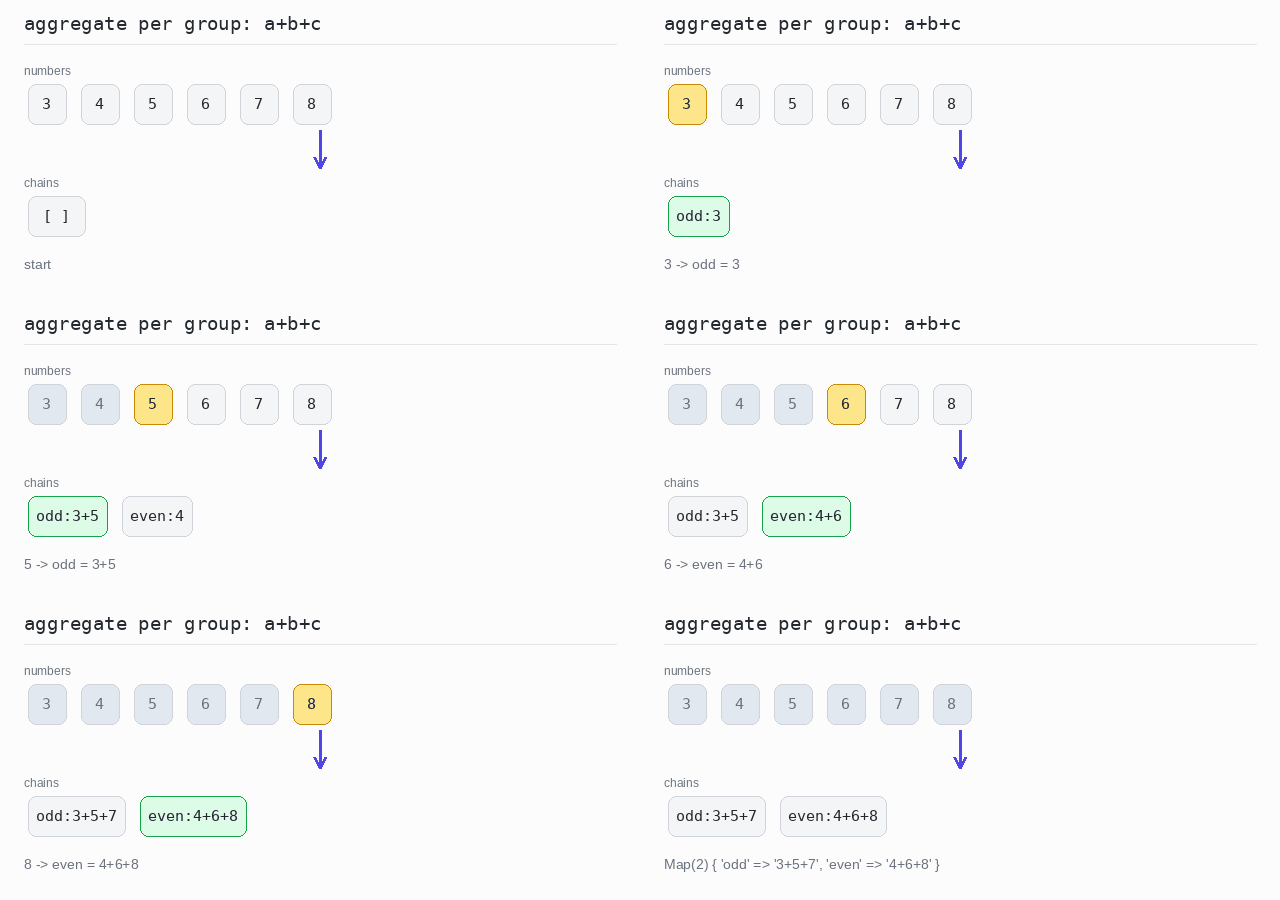
const numbers: number[] = [3, 4, 5, 6, 7, 8]

const chains = numbers.reduce((acc, n) => {
  const key = n % 2 === 0 ? "even" : "odd"
  const current = acc.get(key)
  // undefined means this is the first number of the group.
  return acc.set(key, current === undefined ? String(n) : current + "+" + n)
}, new Map<string, string>())

console.log(chains)