What It Is
The Composite pattern treats single things and groups of things through the same interface. A file has a size; a folder full of files (and folders) has a size too — so both implement size(), and code that sums sizes never asks which one it holds.
Composites naturally form trees: groups contain leaves and other groups, to any depth.
Example: Files and Folders
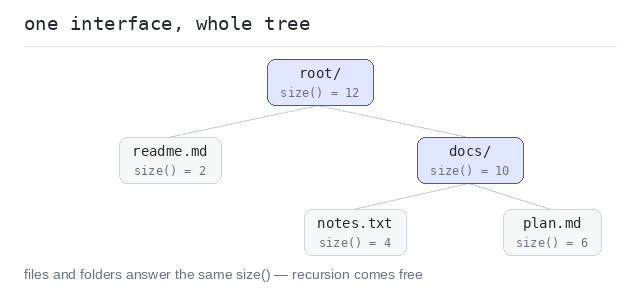
The Item interface has one method. A FileItem answers with its own size; a Folder asks everything inside and adds it up — recursion falls out for free.
One interface for leaf and group
root.size() walks the whole tree without one type check: the folder does not care whether an item is a 4 KB file or another folder hiding ten more. The docs folder answers 10, and root answers 12 — its own 2 KB file plus everything in docs.
Output: TypeScript file and captured output
interface Item {
  size(): number
}

// A leaf: it simply knows its own size.
class FileItem implements Item {
  name: string
  private kb: number

  constructor(name: string, kb: number) {
    this.name = name
    this.kb = kb
  }

  size(): number {
    return this.kb
  }
}

class Folder implements Item {
  name: string
  private items: Item[]

  constructor(name: string, items: Item[]) {
    this.name = name
    this.items = items
  }

  // A folder's size is the sum of everything inside — files or folders.
  size(): number {
    let total = 0
    for (const item of this.items) {
      total += item.size()
    }
    return total
  }
}

const docs = new Folder("docs", [
  new FileItem("notes.txt", 4),
  new FileItem("plan.md", 6)
])

const root = new Folder("root", [
  new FileItem("readme.md", 2),
  docs
])

console.log("docs size:", docs.size(), "KB")
console.log("root size:", root.size(), "KB")
When to Use It
Use it for tree-shaped data where groups and single items answer the same questions — file systems, menus with submenus, UI layouts, organization charts.
Skip it for flat lists. An array with a loop needs no pattern.
Pros and Cons
Pros: client code stays flat and simple; trees of any depth come for free; new leaf or group classes plug into the same interface.
Cons: the shared interface can force awkward methods on leaves (what is a file's "add child"?); very general composites become hard to constrain.