Filtering a Collection
Filtering means picking out the elements of a collection that match a condition.
The condition is written as a function that takes one element and returns true (keep it) or false (skip it). Such a function is called a predicate.
Filtering builds a new array. The original array is not changed.
PHP has a built-in filter: array_filter(). It takes an array and a predicate and returns a new array with the elements the predicate says yes to. The short arrow-function syntax fn($w) => ... keeps the call compact.
One thing to remember: array_filter() keeps the original keys. When you want a clean list numbered from 0 again, wrap the result in array_values().
Filter by Predicate
The simplest way to filter is to pass the array and a predicate to array_filter(). By default the predicate receives only the value.
With the flag ARRAY_FILTER_USE_BOTH the predicate receives the value and the key, so an associative array can be filtered by both at once. The flag ARRAY_FILTER_USE_KEY passes only the key.
In a plain list the keys are the positions 0, 1, 2, …, so ARRAY_FILTER_USE_BOTH also lets a condition use the index of the element.
To keep the elements that do not match, put ! in front of the condition. PHP has no separate filterNot.
A PHP array can hold values of different types. is_string() checks whether a value is a string, and $v !== null skips the entries that hold no value.
Filter an array
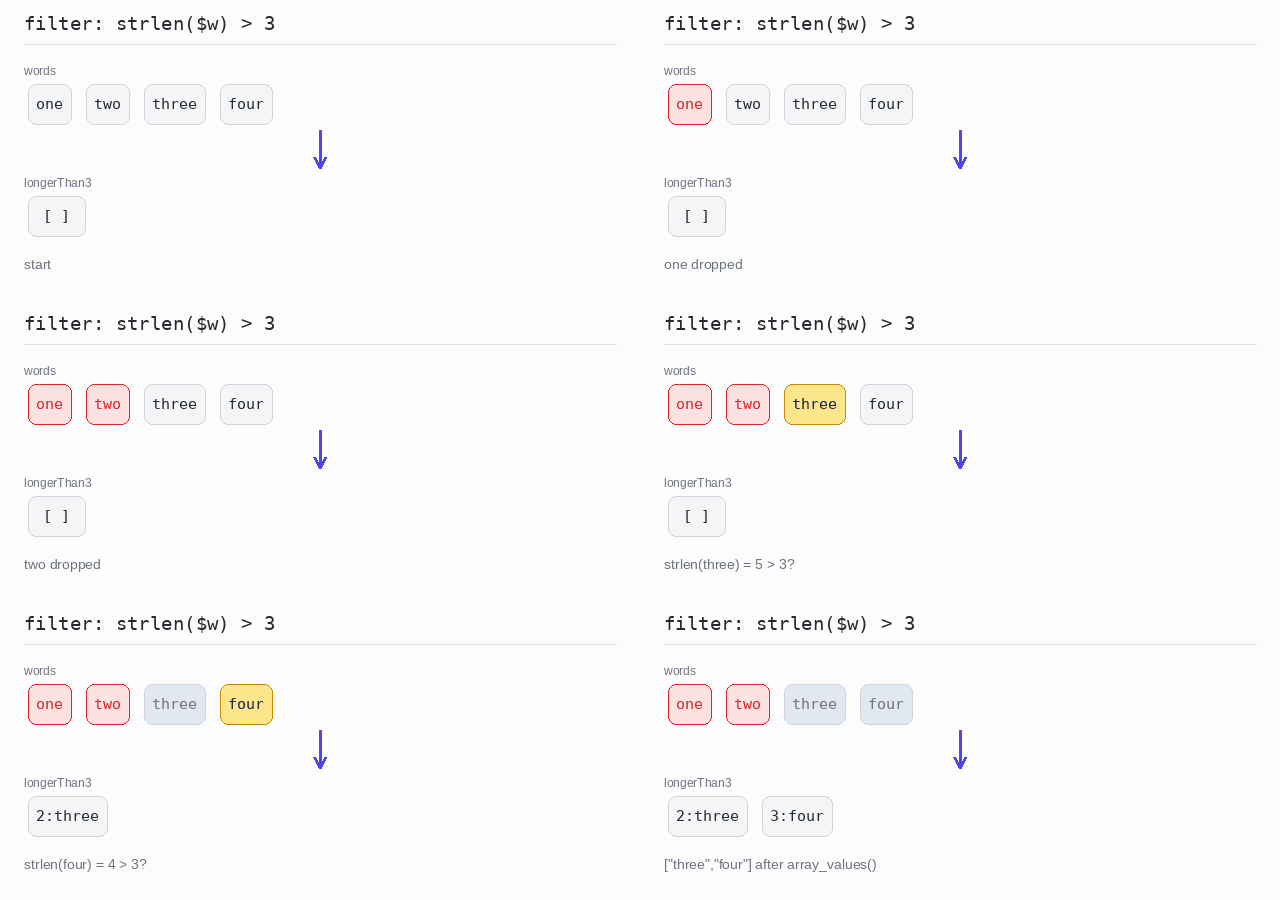
Keep only the words that are longer than 3 letters. The condition strlen($w) > 3 is passed to array_filter() as an arrow function.
array_filter() keeps the original keys, so the kept words still sit at 2 and 3 and json_encode() prints {"2":"three","3":"four"}. After array_values() the keys start at 0 again and the same call prints the clean list ["three","four"].
Output: PHP script
<?php

$words = ["one", "two", "three", "four"];

// array_filter() keeps every element the predicate says yes to.
$longerThan3 = array_filter($words, fn($w) => strlen($w) > 3);

// The original keys survive: "three" and "four" keep the keys 2 and 3.
echo json_encode($longerThan3), "\n";

// array_values() renumbers the keys from 0, giving a clean list.
echo json_encode(array_values($longerThan3)), "\n";
Filter an associative array
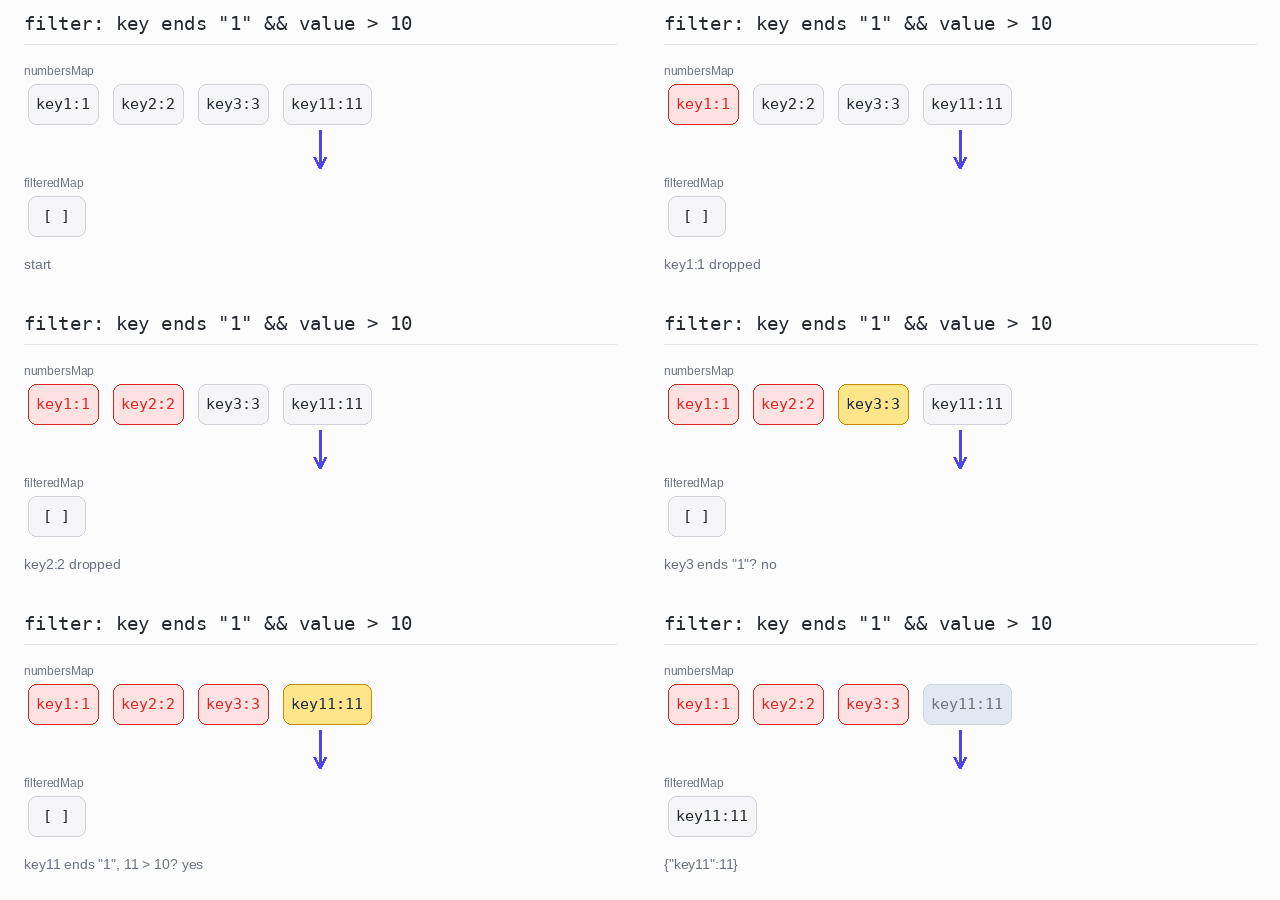
The pairs whose key ends with "1" and whose value is greater than 10 are kept. The flag ARRAY_FILTER_USE_BOTH makes array_filter() hand both the value and the key to the predicate, and str_ends_with() checks the end of the key.
Output: PHP script
<?php

$numbersMap = ["key1" => 1, "key2" => 2, "key3" => 3, "key11" => 11];

// ARRAY_FILTER_USE_BOTH hands the predicate the value and the key.
$filteredMap = array_filter(
  $numbersMap,
  fn($value, $key) => str_ends_with($key, "1") && $value > 10,
  ARRAY_FILTER_USE_BOTH
);

echo json_encode($filteredMap), "\n";
Filter using the index
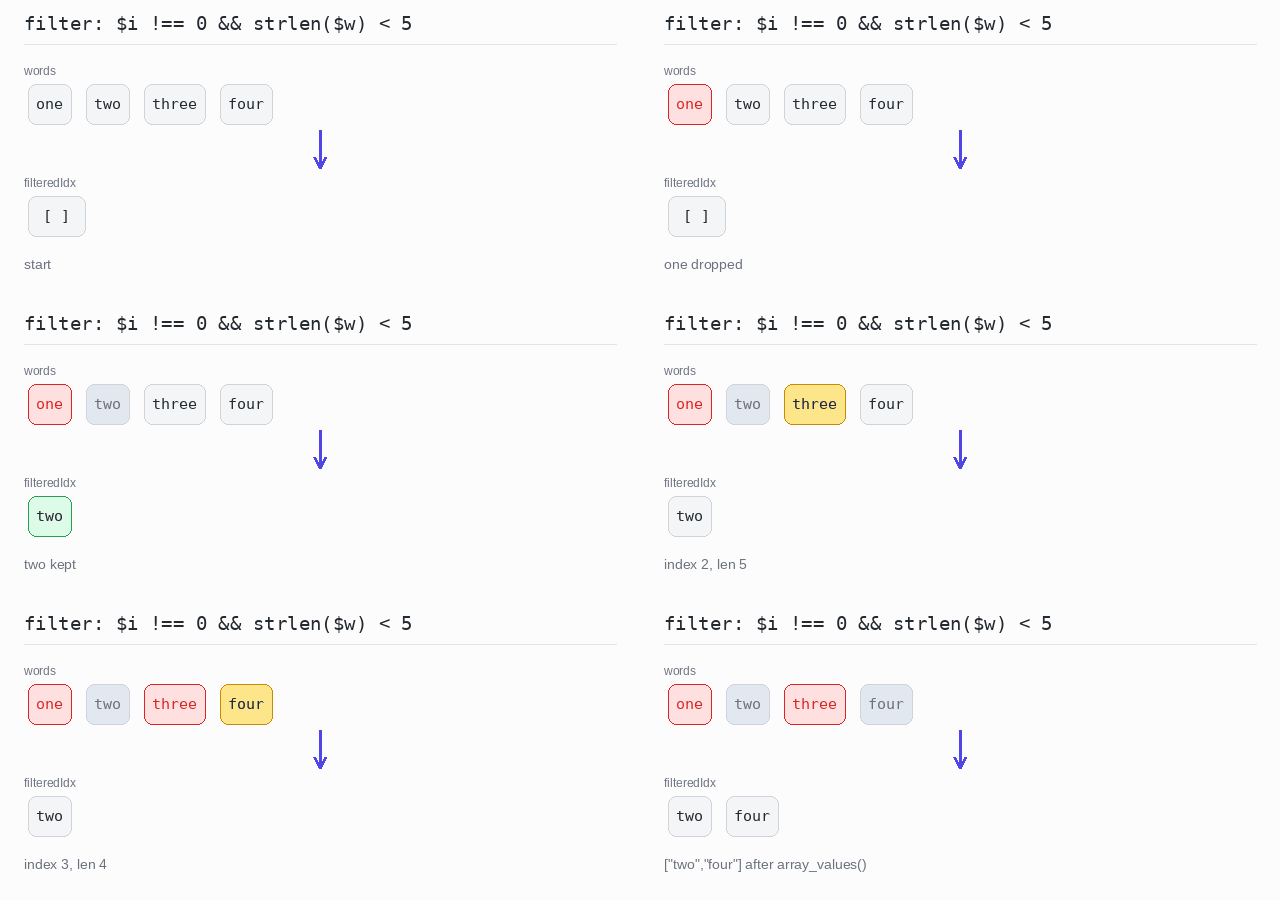
In the list the key of each word is its position. With ARRAY_FILTER_USE_BOTH the predicate sees the word and its index. A word is kept only when its index is not 0 and it has fewer than 5 letters.
Output: PHP script
<?php

$words = ["one", "two", "three", "four"];

// In a list the keys are the positions, so the key is the index.
$filteredIdx = array_filter(
  $words,
  fn($w, $i) => $i !== 0 && strlen($w) < 5,
  ARRAY_FILTER_USE_BOTH
);

echo json_encode(array_values($filteredIdx)), "\n";
Filter with a negated condition
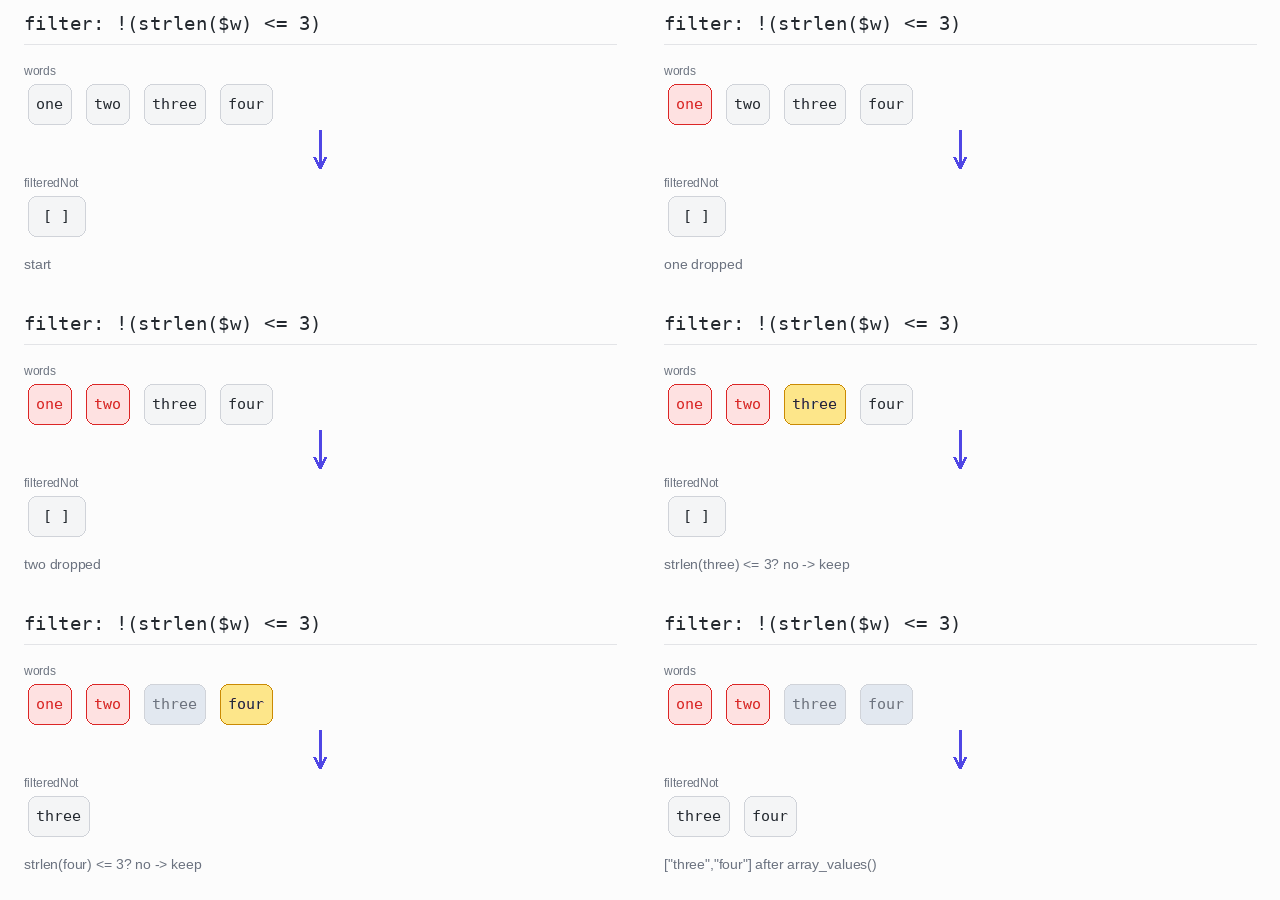
Drop the words with 3 letters or fewer. The condition strlen($w) = 3 is negated with !, so only the longer words stay.
Output: PHP script
<?php

$words = ["one", "two", "three", "four"];

// PHP has no filterNot: negate the condition with ! inside the predicate.
$filteredNot = array_filter($words, fn($w) => !(strlen($w) <= 3));

echo json_encode(array_values($filteredNot)), "\n";
Filter by type
The array holds null, a number, two strings and a float. The callback is_string(...) is the built-in function itself, passed with the first-class callable syntax. Each kept string is printed in upper case.
Output: PHP script

<?php

$mixed = [null, 1, "two", 3.5, "four"];

// is_string(...) passes the built-in function itself as the predicate.
$strings = array_filter($mixed, is_string(...));

foreach ($strings as $s) {
  echo strtoupper($s), "\n";
}
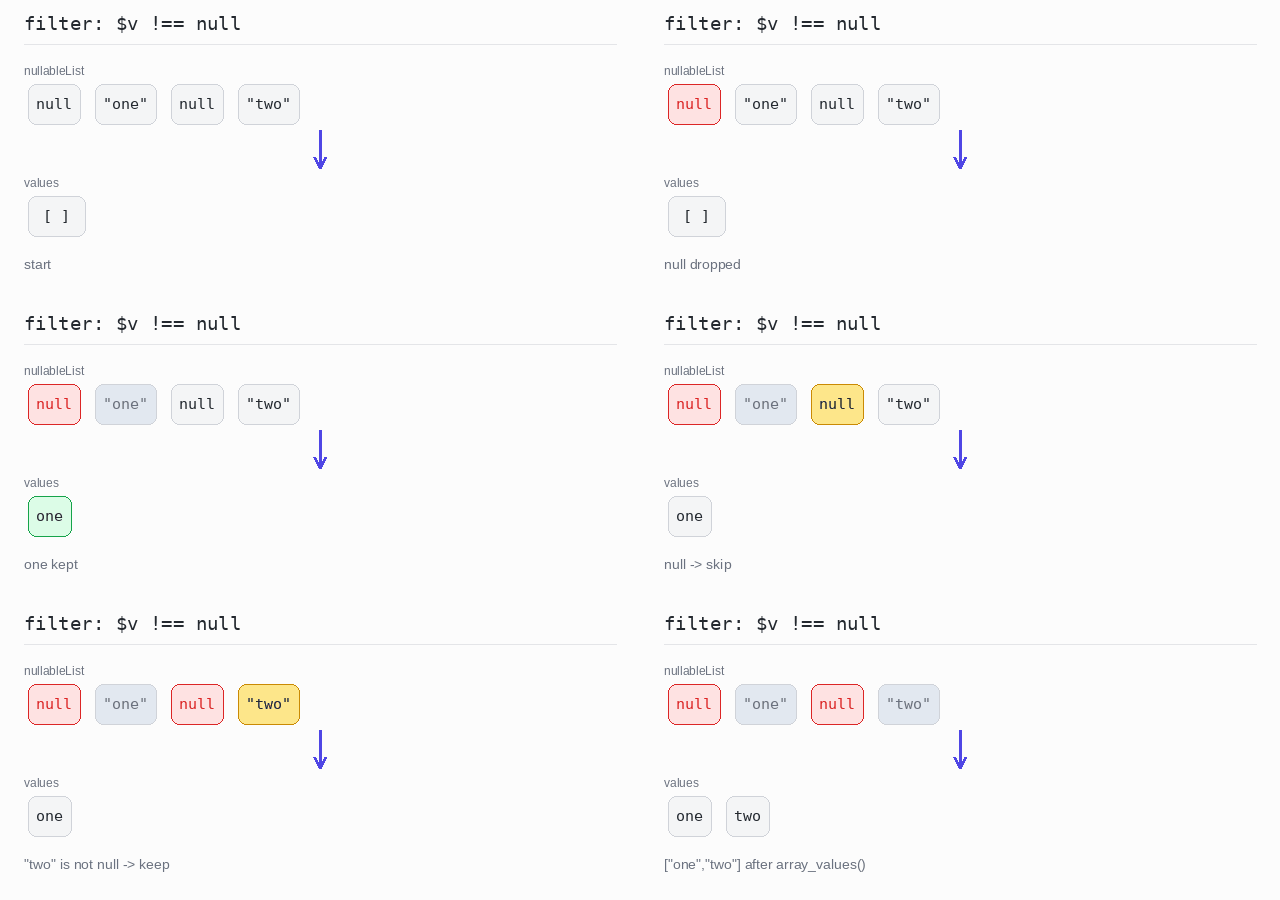
Filter out null values
The array holds strings and null entries. The explicit test $v !== null keeps the real values. Do not call array_filter() without a callback here: it would drop every "falsy" value, including 0, "" and even the string "0".
Output: PHP script
<?php

$nullableList = [null, "one", null, "two"];

// Test against null yourself: with no callback, array_filter() would
// also drop every other "falsy" value, such as 0, "" and "0".
$values = array_filter($nullableList, fn($v) => $v !== null);

echo json_encode(array_values($values)), "\n";
Partition
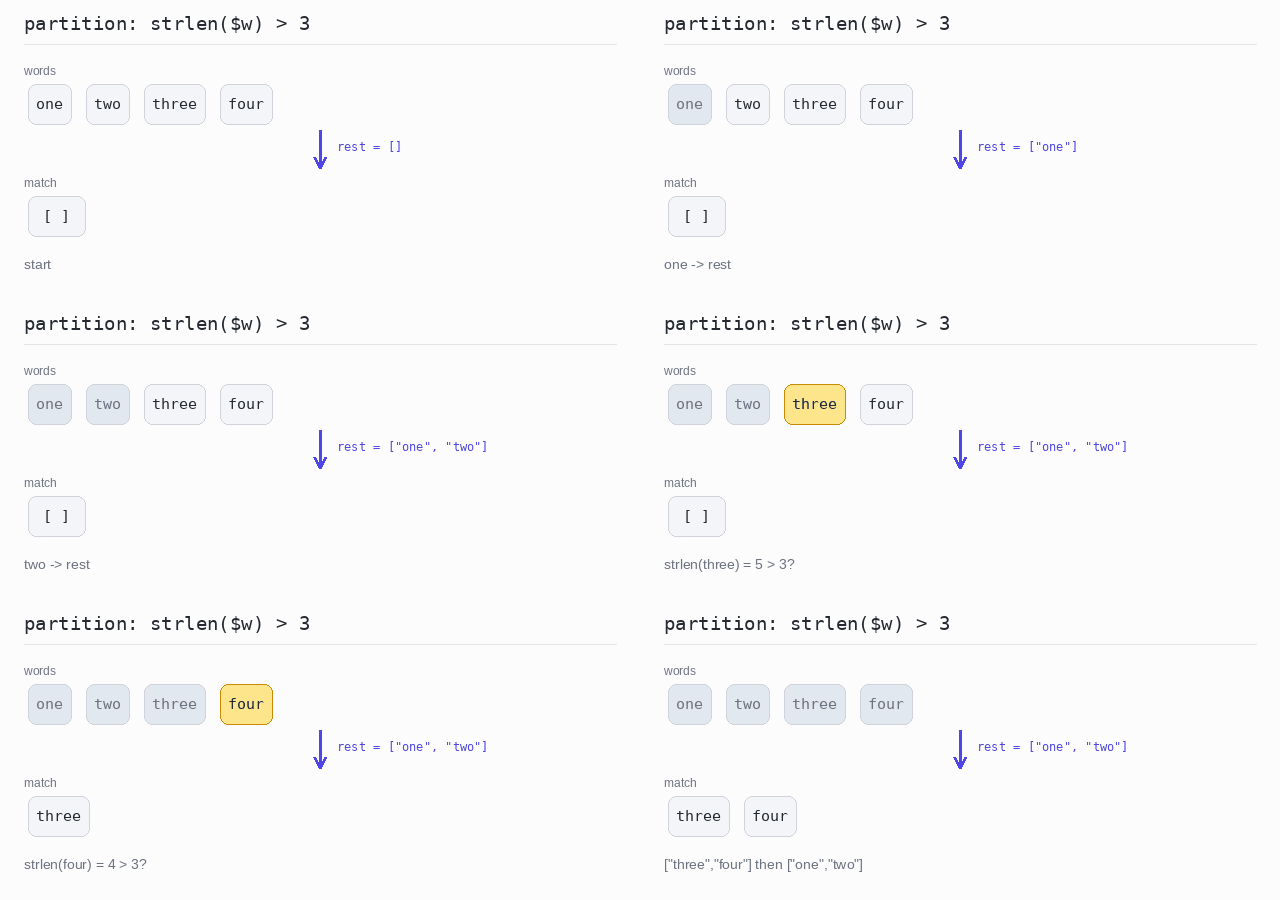
Sometimes you want both groups: the elements that match and the ones that do not.
PHP has no built-in partition. One foreach loop does it: each element is appended with []= to either the $match array or the $rest array. After the loop you have both arrays.
Split an array in two
Words longer than 3 letters go into $match; all the others go into $rest. Both arrays are printed.
Output: PHP script
<?php

$words = ["one", "two", "three", "four"];

$match = [];
$rest = [];
foreach ($words as $w) {
  if (strlen($w) > 3) {
    $match[] = $w;
  } else {
    $rest[] = $w;
  }
}

echo json_encode($match), "\n";
echo json_encode($rest), "\n";
Test Predicates
Sometimes you do not need the matching elements, only a yes or no answer.
- any: does at least one element pass the test?
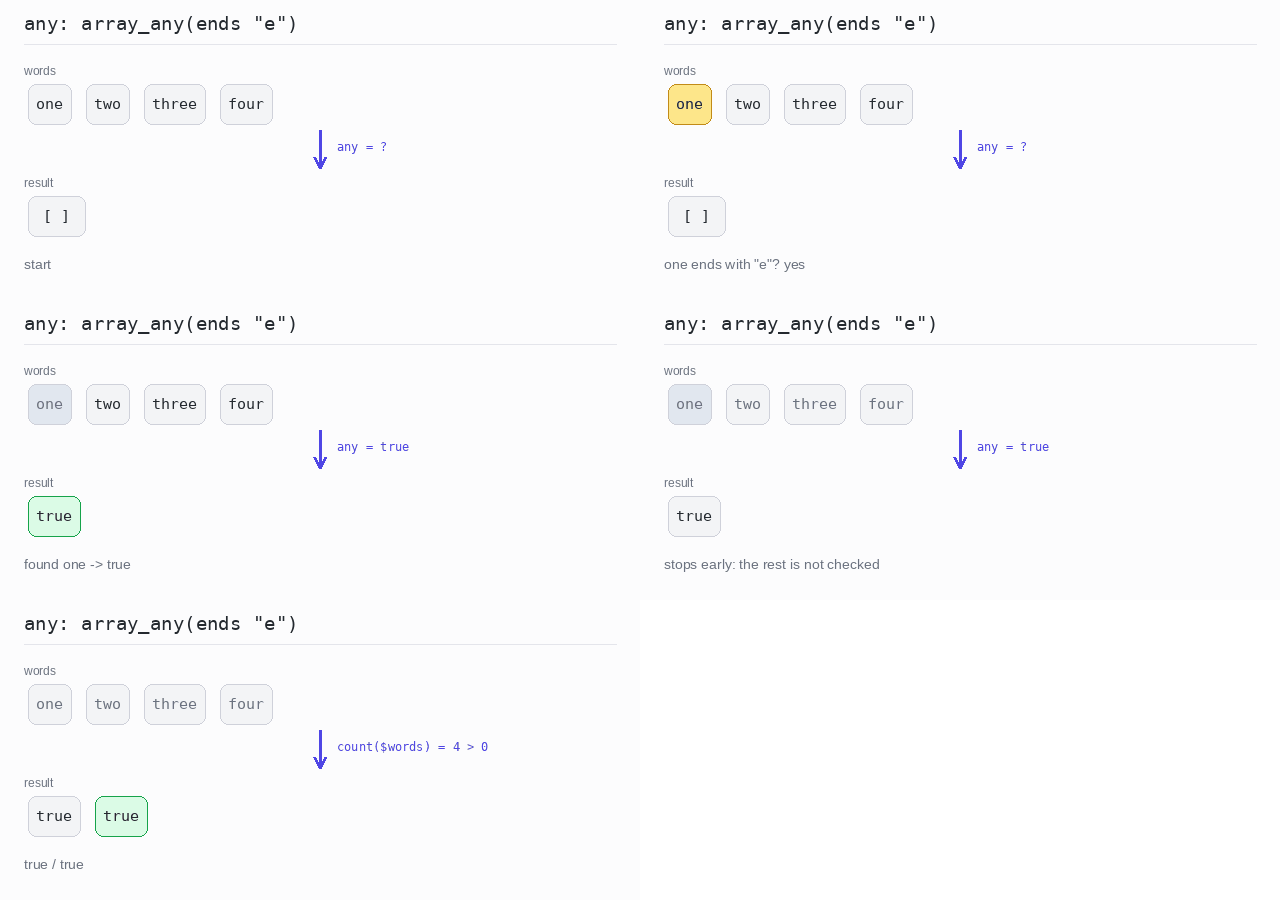
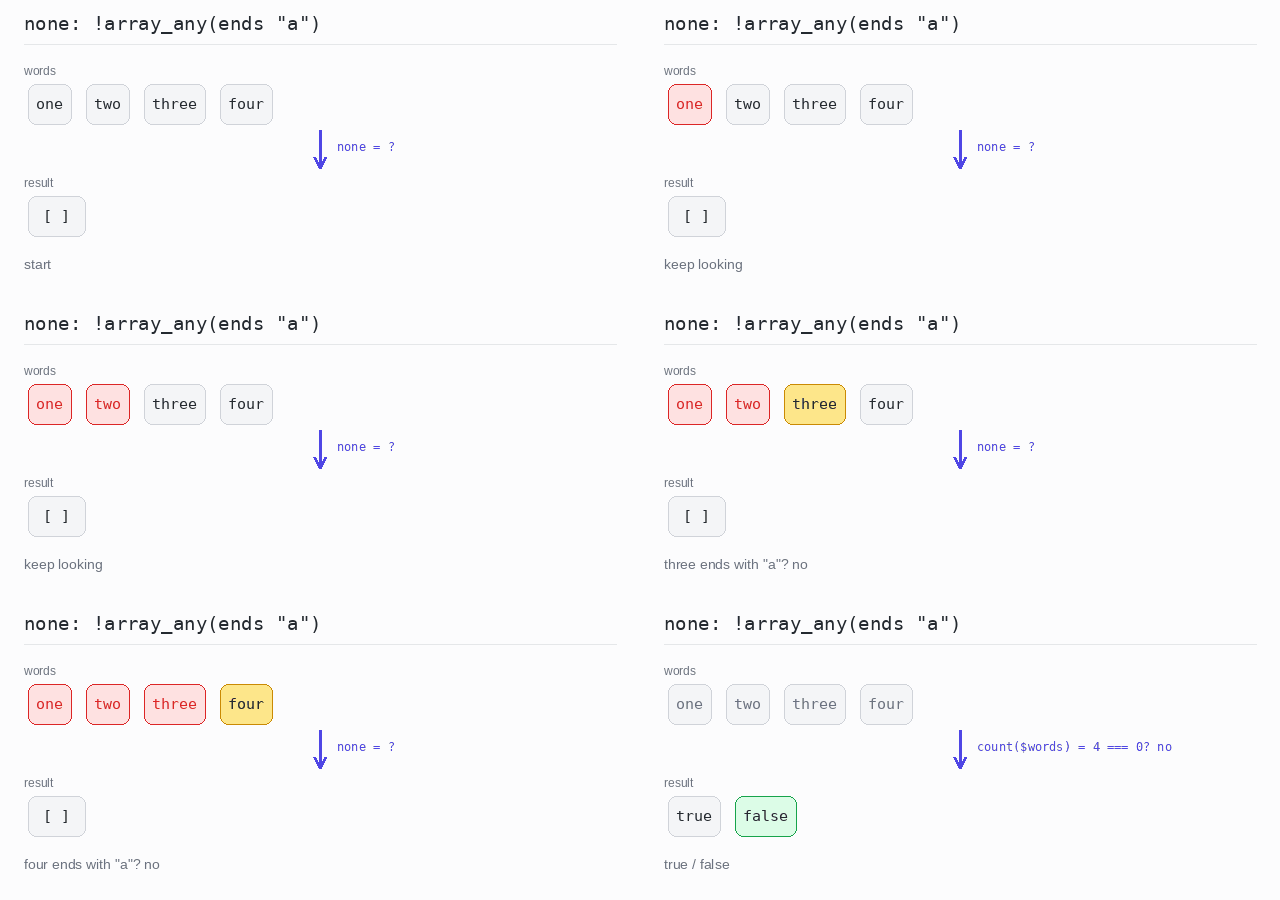
array_any(), new in PHP 8.4, answers this and stops at the first match. - none: does no element pass the test? Put
!in front ofarray_any(). - all: does every element pass the test?
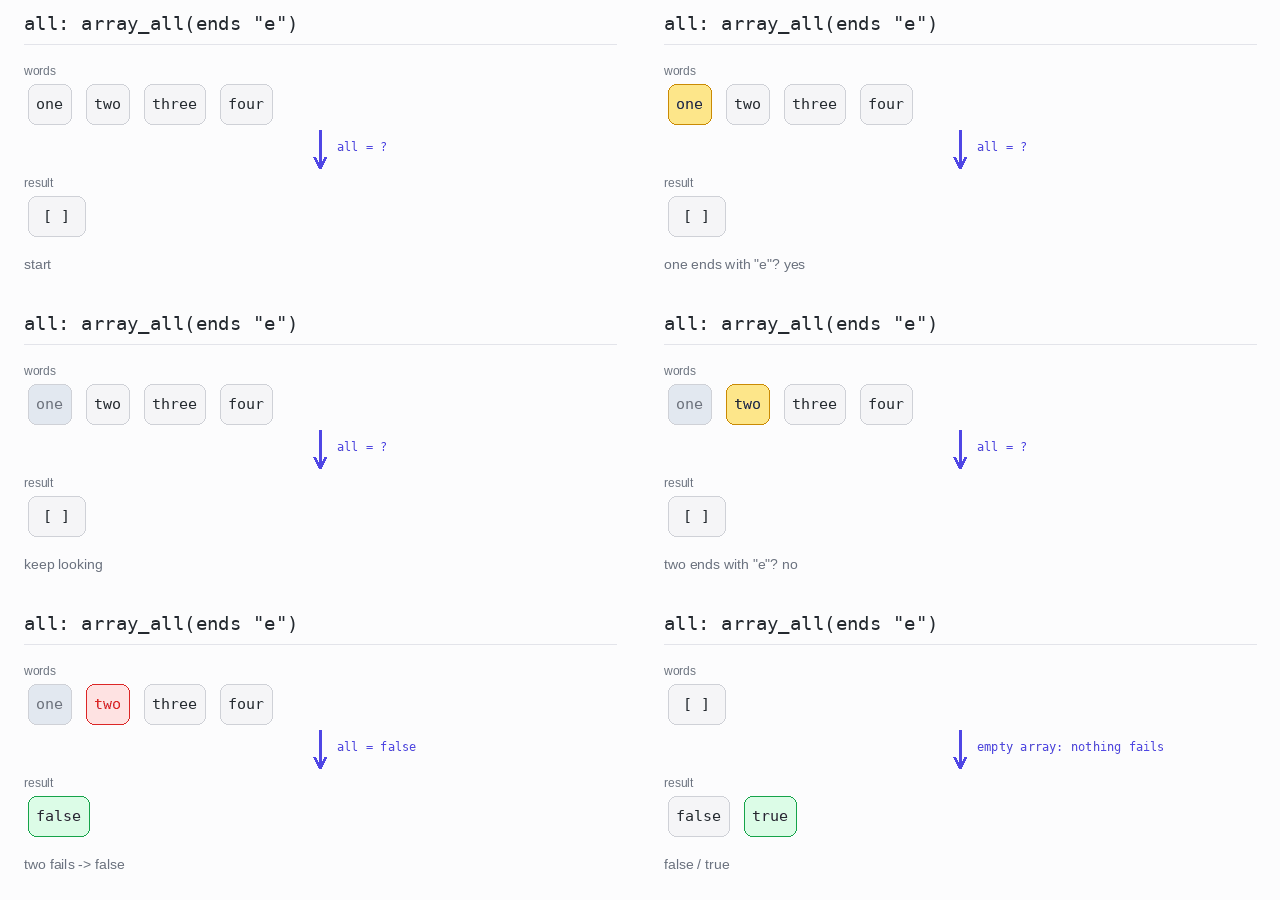
array_all(), also new in PHP 8.4, answers this.
Without a condition, "any element at all?" is count($arr) > 0 and "no element at all?" is count($arr) === 0.
On an empty array, array_all() returns true. There is no element that fails the test, so the test is never broken. This is called vacuous truth.
The examples print the answers with json_encode(), which turns the booleans into the readable text true and false.
any
Check whether at least one word ends with "e", then check whether the array has any element at all. array_any() stops as soon as "one" passes — the other words are not tested.
Output: PHP script
<?php

$words = ["one", "two", "three", "four"];

// array_any() is true if at least one element passes the test.
$anyE = array_any($words, fn($w) => str_ends_with($w, "e"));
echo json_encode($anyE), "\n";

// "any element at all?" is just a count check.
echo json_encode(count($words) > 0), "\n";
none
Check that no word ends with "a", then check whether the array is empty. array_any() finds nothing and returns false, so the ! turns it into true.
Output: PHP script
<?php

$words = ["one", "two", "three", "four"];

// "none" is the opposite of "any": no element passes the test.
$noneA = !array_any($words, fn($w) => str_ends_with($w, "a"));
echo json_encode($noneA), "\n";

// "no element at all?" is just a count check.
echo json_encode(count($words) === 0), "\n";
all
Check whether every word ends with "e". array_all() stops at "two" and returns false. On an empty array it returns true.
Output: PHP script
<?php

$words = ["one", "two", "three", "four"];

// array_all() is true only when every element passes the test.
echo json_encode(array_all($words, fn($w) => str_ends_with($w, "e"))), "\n";

// An empty array has no element that fails, so array_all() is true.
echo json_encode(array_all([], fn($w) => str_ends_with($w, "e"))), "\n";