What It Is
The Adapter pattern makes a class with the wrong interface fit the interface your code expects — like a travel plug between a foreign socket and your charger.
You cannot change the old class (it comes from a library, or other code depends on it). So you wrap it in a small class that implements the protocol you need and translates the calls.
Example: An Old Printer as a Logger
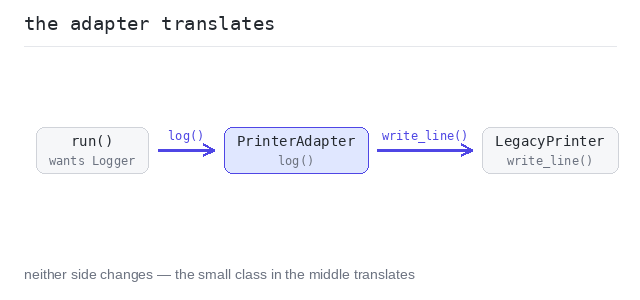
Our code wants a Logger with log(message). The legacy class only offers write_line(prefix, text). The adapter holds the old class and translates one call into the other.
The adapter translates the call
run() works with any Logger; the adapter makes the legacy printer one of them without touching its code.
Output: complete Python program
from typing import Protocol

# The protocol our code expects.
class Logger(Protocol):
  def log(self, message: str) -> None: ...

# An old library class with a different method — we cannot change it.
class LegacyPrinter:
  def write_line(self, prefix: str, text: str) -> None:
    print(prefix + " | " + text)

# The adapter makes the old class fit the new protocol.
class PrinterAdapter:
  def __init__(self, legacy: LegacyPrinter):
    self.legacy = legacy

  def log(self, message: str) -> None:
    self.legacy.write_line("LOG", message)

def run(logger: Logger) -> None:
  logger.log("service started")
  logger.log("request handled")

run(PrinterAdapter(LegacyPrinter()))
When to Use It
Use it when working code and a needed interface do not match, and you cannot (or should not) change either side — third-party libraries, legacy code, generated code.
Skip it when you own both sides — then just change one of them to match. An adapter between two classes you control is a workaround for a decision you could simply make.
Pros and Cons
Pros: old and new code cooperate without changes to either; the translation lives in one small, testable class.
Cons: one more hop to read through; many adapters stacked on each other are a sign the interfaces themselves need rework.